
The Butler-Thinking-Sparring Framework: A Practical Guide to Working with AI
Choose Your Mode Before You Prompt

Over the summer, I wrote a couple of pieces exploring how we need to rethink our relationship with AI — moving away from the “helpful assistant” framing that tech companies push and toward something more intentional. If you read those, you know the core argument: AI isn’t a flawless answer machine. It hallucinates. It’s sycophantic by design. And every interaction is unique, even with the same prompt.
This piece is different. Instead of why we need to change our approach, this is the how. A framework that I hope you can use today.
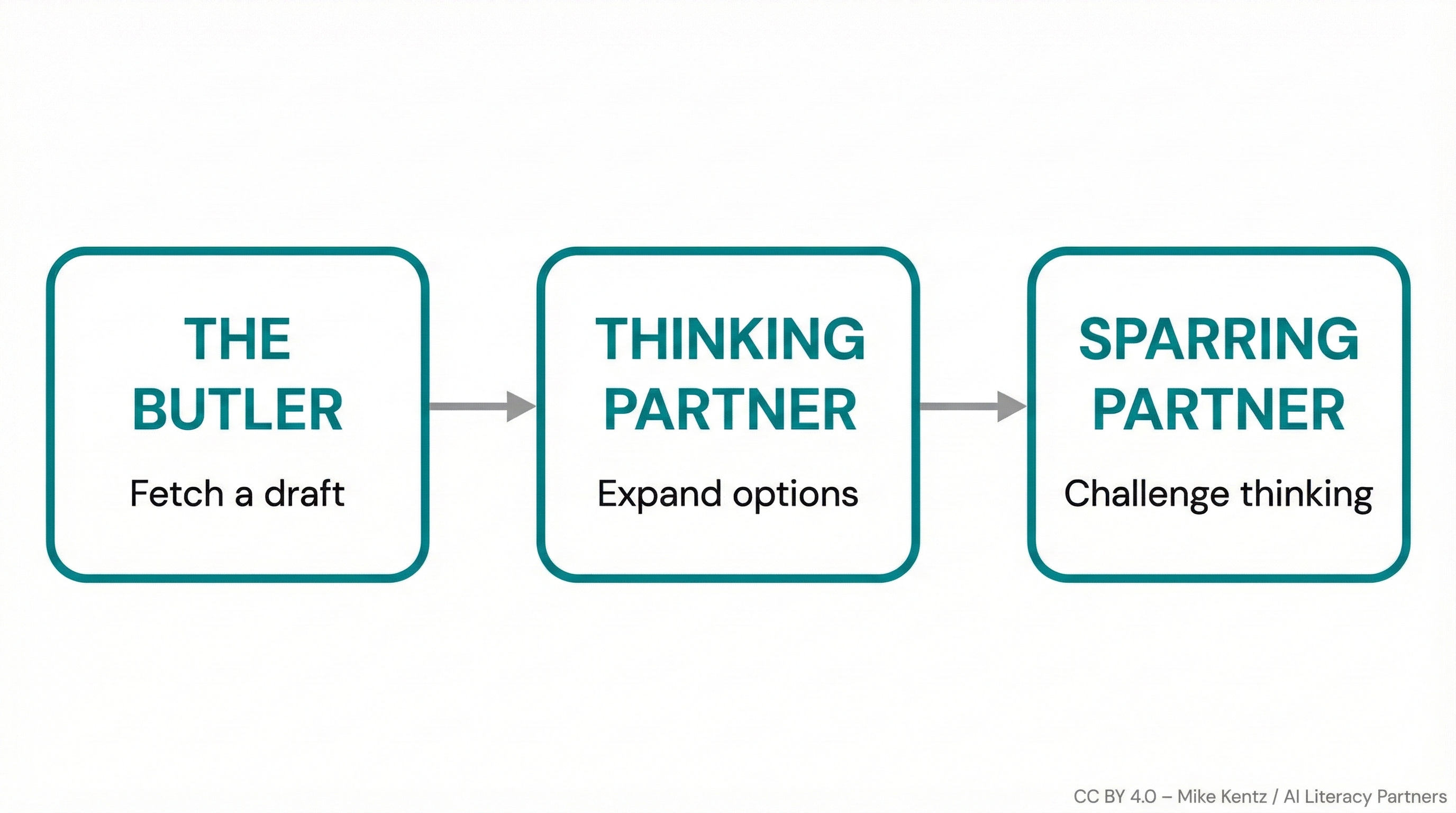
I call it Butler-Thinking-Sparring—three distinct modes for working with AI, each suited to different tasks. The idea is simple: decide what you need before you open the chat window, then prompt accordingly.
No mode is right or wrong. There’s only right for the scenario
The Problem with “Just Ask AI”
Most people approach AI the same way every time: type a question, get an answer, use it. This works fine for simple lookups. But for anything requiring judgment, creativity, or depth, this one-size-fits-all approach creates problems.
You end up either:
Over-relying on AI for tasks where you should be doing the thinking, or
Under-utilizing AI for tasks where it could genuinely expand your perspective
The framework solves this by forcing a moment of reflection: What do I actually need here?
Mode 1: The Butler (Serving Me)
What it is: AI fetches a draft you can judge. You’re the expert with a clear vision; AI handles execution.
Use when:
You have domain expertise in this area
You already know what the deliverable should look like
You can spot errors, clichés, and off-brand tone
You’ve sketched the angle, structure, and must-haves in your head (or on paper)
The key insight: Butler mode only works when you can evaluate what comes back. If you can’t tell whether the output is good or not, you shouldn’t be in butler mode.
Butler Mode Prompt Scaffold
Build your prompt around three elements:
What I Need: “Create a [worksheet / passage / quiz / activity] about [topic] for [grade level].”
Tone & Content: “Make it [friendly / encouraging / clear]. Be sure to cover: [concept 1, concept 2, concept 3].”
Constraints: “[Reading level], [length], [format].”
Example
Create a 10-question quiz on the causes of World War I for 10th graders. Make the tone straightforward but not dry. Cover: the alliance system, militarism, imperialism, and the assassination of Franz Ferdinand. Multiple choice, with one “explain your reasoning” short answer at the end. Keep it to one page.
Notice how specific this is. You’re not asking AI to figure out what matters—you already know. You’re asking it to save you 45 minutes of formatting.
Mode 2: The Thinking Partner (Thinking With Me)
What it is: AI expands your options so you can choose. You have expertise but no clear direction yet.
Use when:
You’re not sure what you want
You need to see the landscape of possibilities before committing
You want angles and trade-offs, not a finished product
You’re trying to avoid premature “butlering” (asking for a deliverable before you know what you need)
The key insight: This mode generates options, exposes assumptions, and helps you think—without locking you into anything.
Thinking Partner Prompt Scaffold
Role: “Be my [brainstorming partner / curriculum advisor / instructional coach] for [topic/skill].”
Give me options: “List 15–20 ways to teach this to [grade level].”
For each one: “Brief description + 1 pro + 1 con.”
Recommend: “Your top 3 picks and why they’d work for my class.”
Example
Be my brainstorming partner for teaching thesis statement writing to 9th graders. Give me 15 different approaches I could take—anything from traditional instruction to games to peer activities. For each one, give me a one-sentence description, one strength, and one limitation. Then tell me which 3 you’d recommend for a class that’s skeptical of writing and why.
A warning: A prompt like this could create a painfully long (and annoying) response. Consider chopping it into smaller pieces and delivering it one-by-one. That reduces cognitive overwhelm for you and makes it much easier to digest the ideas and concepts.
Mode 3: The Sparring Partner (Pushing Me)
What it is: AI challenges and deepens your thinking. Put simply, you are pressure-testing an idea before it goes live.
Use when:
You’re new to a topic and need to build depth fast
Your direction is unclear and you want to stress-test options
You want to surface gaps, blind spots, or bias in your thinking
You’re preparing for skeptical stakeholders (parents, admin, students)
The key insight: Sparring mode is practice, not a shortcut to publish. The value isn’t in AI being “right”—it’s in forcing you to defend your position. Even weak objections can reveal something you hadn’t considered.
Sparring Partner Prompt Scaffold
Be my: “[skeptical parent / confused student / tough administrator / devil’s advocate].”
Here’s my plan: “[Describe what you’re planning to do].”
Challenge it: “Find 3 problems OR ask 3 hard questions I should consider.”
Suggest alternatives: “Give me 2 better approaches and explain the trade-offs.”
Example
Be a skeptical parent who’s worried about screen time and AI dependency. Here’s my plan: I want to use AI chatbots in my 7th grade English class to give students real-time feedback on their drafts before peer review. Challenge this plan—give me 5 legitimate concerns a parent might raise. Then suggest 2 modifications that might address those concerns without gutting the activity.
Same warning here — these could produce extremely long responses, so consider chopping this up into smaller bits. Additionally, sparring only seems to work for me when I truly commit to the bit. I do my best to engage with the challenges as if they are real - not because they necessarily are - but because doing so allows me to see farther than I can alone. Consider the same mindset when you engage with this mode.
How to Choose Your Mode
Before you prompt, ask yourself two questions:
1. Do I know what I want?
Yes, clearly → Butler
Sort of, but I need options → Thinking Partner
Not really, or I want to stress-test → Sparring Partner
2. Can I evaluate the output?
Yes, I’m an expert here → Butler is safe
Somewhat → Thinking Partner (you’re choosing from options, not judging a final product)
No, I’m learning → Sparring Partner (you’re building understanding, not accepting answers
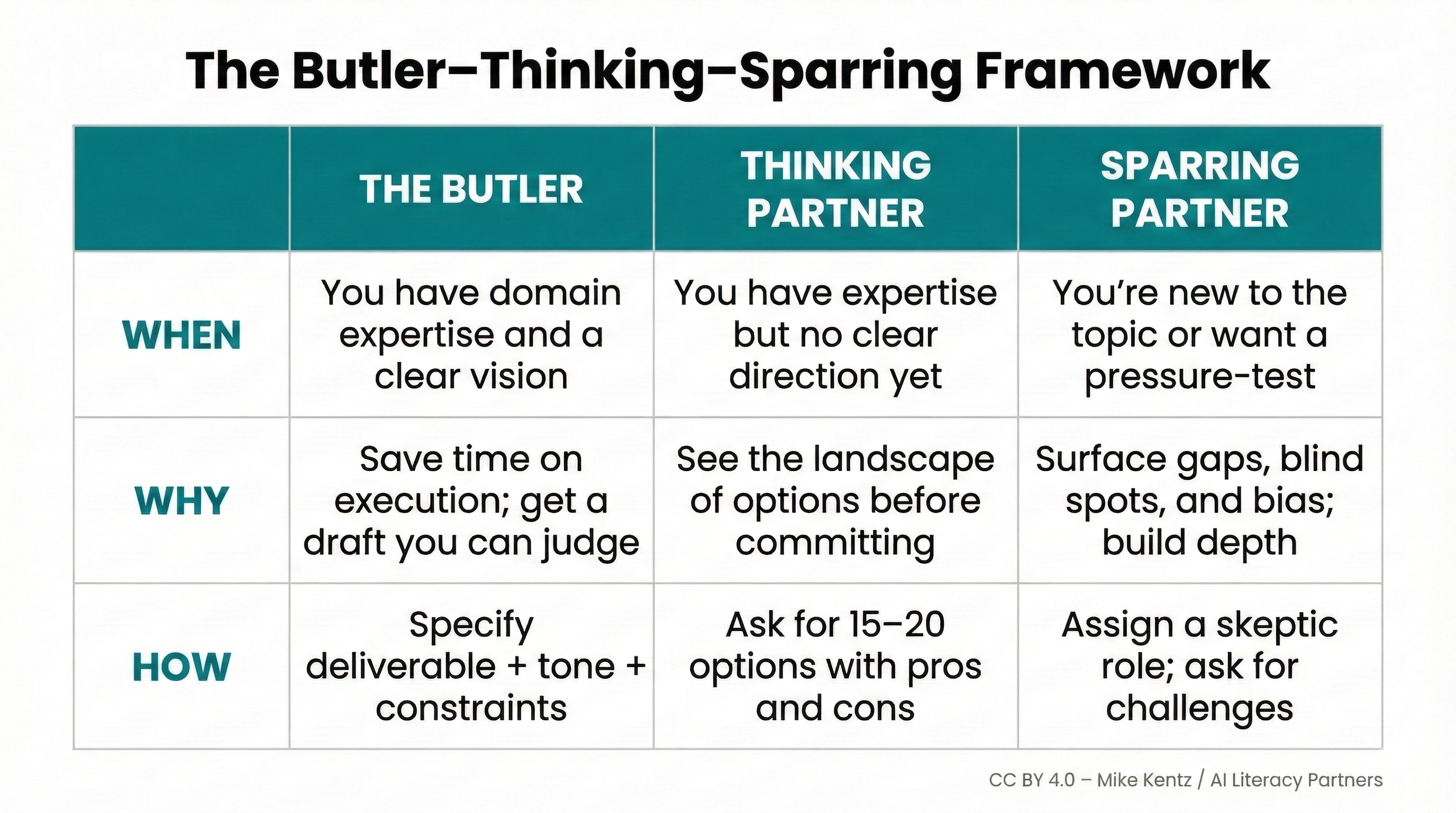
The below will also hopefully help to capture the conceptual framework in an easy to view way. Feel free to use it any way you see fit.
How to Use This With Students
What I’ve found in my explorations is that my own Butler-Thinking-Sparring experiments become teaching artifacts unto themselves. Each time I try a different mode or approach, something new occurs. From there, I take out my microscope and look closely. What happened here?
This detective work is not only fascinating, its practically beneficial. You are essentially teaching yourself far better than any prompt engineering course ever could — and your gains extend beyond the chat, because reflection has a habit of doing that.
And so, time permitting, I ask my students to do the same - take out the microscope and have a gander. I ask them to do it on their own AI interactions, on my AI interactions, and on their peer’s interactions.
It seems scary, but it’s not — especially if you know going in that someone is going to view it later, and that you are trying to achieve or perform or demonstrate some particular communication and/or critical thinking skill.
Try it out. Use AI as a butler, then a thinking partner, then a sparring partner - all within the same project or (even better) for the same task. Then, print them out, grab a pen, and ask, “What was I doing here? What happened? How did it go? What can I learn from this?”
Once you’ve found something worth discussing - and believe me, you will — print out some new copies (perhaps two at a time) and have your students do the same thing. What’s happening here? Which one is better (not best)? Why?
It’s simple, but it works. And it’s direct AI literacy instruction.
👏👏👏Thx Mike a lot for this so clear and straightforward tips and examples on “employing” AI. They are so helpful when showing and discussing with teachers and school leaders how to approach/use GenAI. Again many 🙏🙏🙏